




Table of Content
How to Work and Travel: A Practical Guide to Remote Work on the Road

Working while traveling sounds flexible, but it only works when your job, schedule, internet setup, and travel plans support it. In this LEVEL8 guide, you’ll learn how to work and travel without turning every day into a rushed mix of meetings, check-ins, and missed deadlines.
Can You Really Work and Travel at the Same Time?
Yes, you can work and travel at the same time if your job is location-flexible, your workload is realistic, and your travel plans are built around work first. It works best for roles with async communication, clear deliverables, fewer live meetings, and tasks that can be done with a laptop and stable internet.
- Yes, if your job allows location flexibility. A remote job does not always mean “work from anywhere,” so check company rules first.
- Yes, if you plan workdays separately from travel days. Moving cities, catching flights, and taking long tours are hard to combine with deep work.
- Yes, if you have stable internet and backup tools. Your accommodation Wi-Fi, hotspot, eSIM, and power setup matter as much as your destination.
- No, if your employer, visa, schedule, or workload does not support it. Some roles require fixed locations, secure networks, core hours, or legal approval.
Choose a Work-and-Travel Rhythm That Fits Your Job
The biggest mistake is treating remote travel like a vacation with a few work calls added. A better plan starts with your work rhythm, then builds travel around it.
Short Trips While Working Remotely
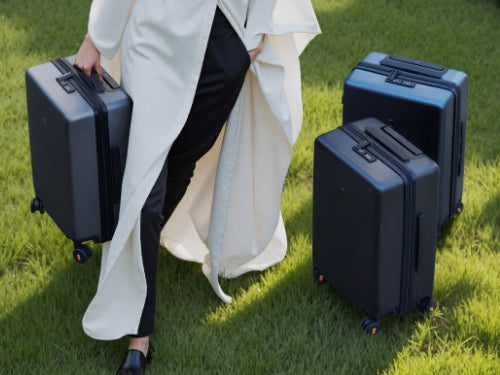
Short trips work best when you do not change too many things at once. Stay within a similar time zone, book accommodation with strong Wi-Fi, and keep sightseeing light on workdays. This style is good for long weekends, one-week city stays, or visiting family while keeping your regular work schedule. For trips where you still need to carry a laptop, chargers, work clothes, and daily essentials, the best carry-on luggage for business travel should keep everything organized without making a short stay feel overpacked.
Slow Travel From One Base
Slow travel is usually the easiest way to work and travel. Staying two to four weeks in one place gives you time to learn the area, find reliable coffee shops or coworking spaces, and build a routine. It also reduces the stress of packing, moving, and resetting your workspace every few days.
Separate Workdays From Travel Days
Try not to schedule flights, long train rides, check-ins, and important meetings on the same day. Use weekends or low-meeting days for transportation. On workdays, keep travel plans simple: one walk, one dinner plan, or one nearby activity after work is usually enough.
Match Meetings to Time Zones
Time zones can make or break a work-and-travel plan. Before you book, compare your destination time with your team’s working hours. If most meetings happen at 9 a.m. New York time, working from Europe or Asia may mean late evenings or overnight calls. Choose destinations where your schedule is still sustainable.

Set Up Internet, Workspace, and Work Tools
Reliable internet is the foundation of working while traveling. Before you book a stay or move to a new city, think through your main connection, backup connection, workspace, and what you will do if Wi-Fi fails before an important meeting.
Check Wi-Fi Before Booking Accommodation
Do not rely only on “free Wi-Fi” in a hotel or rental listing. Look for reviews that mention remote work, video calls, or internet speed, and ask the host or hotel for a speed test if your work depends on calls or large file uploads. Also check whether the room has a real desk, comfortable chair, enough outlets, and a quiet space for meetings.
Have a Backup Internet Plan
Always have a second way to get online. A local eSIM, mobile hotspot, phone tethering, or nearby coworking space can save your workday if hotel Wi-Fi becomes unstable. Before important calls, test the connection, charge your laptop, keep a power bank nearby, and download key files for offline access. If the meeting is important, identify a backup location before the call starts, not after the Wi-Fi drops.
Use Tools for Calls, Files, Security, and Time Zones
Set up your work tools before leaving home. You may need video meeting apps, cloud file access, offline documents, a VPN, password manager, two-factor authentication, calendar tools, and a world clock. For longer trips, check whether your company has data security rules for public Wi-Fi, coworking spaces, file storage, or working from another country.
Check Work Policies, Visas, and Taxes Before You Go
This part is easy to overlook, but it matters. Remote work from another place can create company, immigration, tax, payroll, or data security issues.
Confirm Your Employer Allows Work From Another Location
Ask whether your employer allows remote work from another city, state, or country. Some companies allow domestic remote work but restrict international work. Others may require approval, limit the number of days, or ban work from certain countries for legal or security reasons.
Check Visa and Entry Rules for Each Destination
Tourist entry does not always allow remote work. Some countries have digital nomad visas or remote work permits, while others may not allow paid work during a tourist stay. Check the official government rules for each destination, especially if you plan to stay longer than a short vacation.
Understand Tax and Legal Risks for Longer Stays
Longer stays can raise tax, residency, payroll, and employment-law questions. This is especially important if you are staying for months, moving between countries, or working for a company based in another country. For longer remote work trips, speak with your employer, HR, or a tax professional before assuming the setup is simple.
Pack for Remote Work and Easy Travel
Packing for remote work is different from packing for vacation. You need to protect your tech, keep work essentials easy to reach, and avoid carrying so much that every location change becomes stressful.

Bring the Right Work Gear
Start with your laptop, charger, phone charger, adapter, headphones, mouse, power bank, and any device your company requires for login or security. The best travel accessories for remote work are the ones that keep your setup lighter, more reliable, and easier to use between airports, hotels, and temporary workspaces. If your work involves spreadsheets, design, editing, or long writing sessions, a portable monitor can make longer workdays easier. Also make sure your VPN, password manager, two-factor authentication, cloud files, and offline backups are set up before you leave, not after you arrive.
Keep Tech, Documents, and Essentials in Your Carry-On
Keep your laptop, chargers, work documents, passport, wallet, medication, and one change of clothes in your carry-on luggage. Important files should be saved in secure cloud storage, with key documents available offline in case Wi-Fi is weak. Do not check anything you need for work the next day, because a delayed bag can turn into a missed meeting or lost workday.
Travel Light When You Change Locations Often
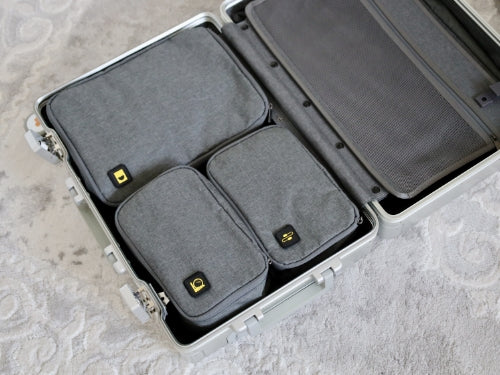
People who work and travel often carry more tech than regular vacationers, so organization matters as much as space. The LEVEL8 Voyageur Carry-On 20'' works well for this kind of travel because its wide-handle packing space, organized interior, compression system, and smooth spinner wheels help separate laptop accessories, clothes, toiletries, and daily essentials. That makes it easier to move between airports, hotels, coworking spaces, and short-term rentals without unpacking your whole bag every time.
Avoid Burnout While Working and Traveling
The goal is not to work full-time and travel full-time every day. A sustainable setup needs space for rest, focus, and slower movement.
Stay Longer in Fewer Places
Changing cities too often creates decision fatigue. You lose time to packing, transportation, check-in, grocery runs, and finding a new workspace. Staying longer in fewer places gives you more energy for both work and travel.
Protect Rest Days and Offline Time
Block rest time the same way you block meetings. Leave some evenings free, take walks without your laptop, and schedule days with no major travel or work pressure. If every open hour becomes sightseeing time, you may feel tired even in a beautiful place.
Do Not Treat Every Day Like a Vacation Day
Working while traveling means some days will look ordinary. You may spend the whole day inside, eat a simple meal, and answer emails instead of exploring. That is normal. The trip becomes easier when you stop expecting every day to feel like a highlight.
Conclusion
Working and traveling is realistic when your job allows flexibility, your schedule is planned around work, and your destination supports stable internet and legal entry. Start with short or slow trips, separate workdays from travel days, and build a reliable backup plan before you leave.
LEVEL8’s travel tip is to pack like a mobile work setup, not just a tourist. Keep tech, documents, and essentials close, travel lighter when changing locations often, and choose luggage that helps you stay organized between work calls and travel days.
FAQ
How do you stay productive while traveling?
Keep a fixed work schedule, choose reliable Wi-Fi, separate travel days from workdays, and limit sightseeing on meeting-heavy days. Use backup internet and download key files before important calls.
What should you pack to work and travel?
Pack a laptop, charger, headphones, adapter, power bank, mouse, work documents, password manager access, medication, travel documents, versatile clothing, and a carry-on setup that keeps tech and essentials easy to reach.
How long should you stay in one place while working remotely?
Two to four weeks is often easier than moving every few days. It gives you time to settle into a routine, test the internet, find a workspace, and explore without rushing.
Should you use coworking spaces or work from hotels?
Use coworking spaces if you need reliable internet, quiet calls, or a better desk setup. Hotels can work for lighter tasks, but always check Wi-Fi reviews, desk space, and noise before booking.

Leave a comment